


안드로이드 개발 질문/답변
(글 수 45,052)


http://postfiles8.naver.net/20100923_135/wonism21_1285245661398zoYns_JPEG/%BC%AD%B0%AD%B4%EB2.JPG?type=w2
위의 주소의 그림을 보시면 알겠지만 밑의 오른쪽 구석에 구슬을 넣어서 더 많은 메뉴를 선택할수 있게 하였습니다.
즉 원래는 8개의 메뉴지만 8개를 전부 집어넣을시 복잡해지므로 저렇게 한거지요
그래서 전
framelayout 을 위에 잡고
하나는 visible 로 잡고 나머지는 invisible 로 잡았습니다.
밑의 버튼을 누르면 그에 맞게 위에 레이아웃들이 visible로 변하게 말이죠
또한 오른쪽 밑에 구슬들을 클릭할 경우
invisible의 다른 레이아웃들이 visible로 변함으로 여러 항목을을 보이게 했습니다.
간단하게 예를 들자면 저렇게 됩니다. (제가 글솜씨가 없어서..)
근대 짜증나는 것이 밑의 레이아웃을 RadioButton으로 했을시에는 레이아웃이 예쁘게?
잡히는데 밑의 버튼을 위와 똑같이 framelayout으로 할시에는 layout_weight 의 수치와 상관없이 무조건 절반 절반으로 나뉩니다.
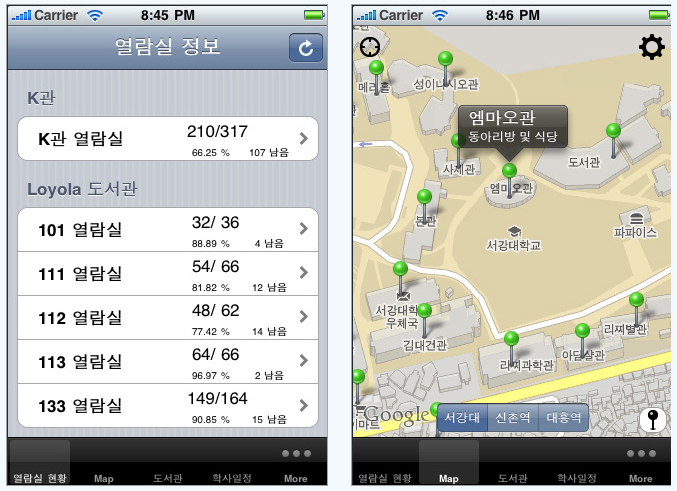
위의 주소의 그림을 보시면 알겠지만 밑의 오른쪽 구석에 구슬을 넣어서 더 많은 메뉴를 선택할수 있게 하였습니다.
즉 원래는 8개의 메뉴지만 8개를 전부 집어넣을시 복잡해지므로 저렇게 한거지요
그래서 전
framelayout 을 위에 잡고
하나는 visible 로 잡고 나머지는 invisible 로 잡았습니다.
밑의 버튼을 누르면 그에 맞게 위에 레이아웃들이 visible로 변하게 말이죠
또한 오른쪽 밑에 구슬들을 클릭할 경우
invisible의 다른 레이아웃들이 visible로 변함으로 여러 항목을을 보이게 했습니다.
간단하게 예를 들자면 저렇게 됩니다. (제가 글솜씨가 없어서..)
| A | B | C | 0* |
| D | E | F | *0 |
근대 짜증나는 것이 밑의 레이아웃을 RadioButton으로 했을시에는 레이아웃이 예쁘게?
잡히는데 밑의 버튼을 위와 똑같이 framelayout으로 할시에는 layout_weight 의 수치와 상관없이 무조건 절반 절반으로 나뉩니다.
제가 만든 xml은
<?xml version="1.0" encoding="utf-8"?>
<LinearLayout xmlns:android="http://schemas.android.com/apk/res/android"
 android:orientation="vertical"
 android:layout_width="fill_parent"
 android:layout_height="fill_parent"
 >
<FrameLayout
 android:layout_width="fill_parent"
 android:layout_height="fill_parent"
 android:layout_weight="10"
 >
 <LinearLayout android:id="@+id/opt_general"
  android:layout_width="fill_parent"
  android:layout_height="fill_parent"
  android:visibility="visible">
  <EditText
   android:layout_width="wrap_content"
   android:layout_height="wrap_content"
   android:text="프로젝트명"
   />
  <Button
   android:layout_width="wrap_content"
   android:layout_height="wrap_content"
   android:text="변경"
   />
 </LinearLayout>
 <LinearLayout android:id="@+id/opt_compiler"
  android:orientation="vertical"
  android:layout_width="fill_parent"
  android:layout_height="fill_parent"
  android:visibility="invisible">
  <CheckBox
   android:layout_width="fill_parent"
   android:layout_height="wrap_content"
   android:text="최적화하기" />
  <CheckBox
   android:layout_width="fill_parent"
   android:layout_height="wrap_content"
   android:text="경고 무시하기" />
 </LinearLayout>
 <TextView android:id="@+id/opt_linker"
  android:layout_width="fill_parent"
  android:layout_height="fill_parent"
  android:text="링커의 옵션"
  android:visibility="invisible" />

</FrameLayout>

//밑의 framlayout
<FrameLayout
 android:layout_width="fill_parent"
 android:layout_weight="0"
 android:layout_height="wrap_content"
 android:background="#00ff00">
 <LinearLayout android:id="@+id/opt_general"
  android:layout_width="fill_parent"
  android:layout_height="wrap_content"
  android:visibility="visible">
  <ImageButton
   android:layout_width="fill_parent"
   android:layout_height="wrap_content" />
  <ImageButton
   android:layout_width="fill_parent"
   android:layout_height="wrap_content" />
  <ImageButton
   android:layout_width="fill_parent"
   android:layout_height="wrap_content" />

 </LinearLayout>
 <LinearLayout android:id
  android:orientation="vertical"
  android:layout_width="fill_parent"
  android:layout_height="wrap_content"
  android:visibility="invisible">
  <ImageButton
   android:layout_width="fill_parent"
   android:layout_height="wrap_content" />
  <ImageButton
   android:layout_width="fill_parent"
   android:layout_height="wrap_content" />
  <ImageButton
   android:layout_width="fill_parent"
   android:layout_height="wrap_content" />
 </LinearLayout>
</FrameLayout>
</LinearLayout>

밑의 framelayout은 제가 만든 부분이고 원래 원판은 "안드로이드 프로그래밍 정복 576p " 에 있는 복잡한 액티비티를 보고 만들었습니다.

즉 한줄로 말한다면 저기 주소대로 있는 프로그램을 만들고 싶은데 framelayout을 두개 겹쳐서하면 이쁘게 안나와요 이겁니다.

대답해주신다면 정말 감사하겠습니다

2010.12.21 07:45:28
굳이 framelayout을 이용하지 않고 하는 방식을 생각해봤는데
gridview를 이용해서 만드는 방법이 있네요
http://rosaria1113.blog.me/111353235
여기를 보시면 알겠지만 저 위의 소스와 거의 동일 합니다
약간만 수정하시면 되실듯.
다른 방법들을 아무리 이용해도 안보이네요..